Cow Ear Sensor Use Guide
How to Use the Cow Ear Sensor(Initial Test)?
-
Insert the battery into the built-in battery compartment of the Cow Ear Sensor, then launch the CattleHub APP. The APP will automatically collect and upload data from the tag and upload to the cloud upon startup.
-
Place your finger on the position corresponding to the device's photoelectric(PPG) sensor (marked as 1 in the figure below), and the Cow Ear Sensor will automatically start data collection.
-
Keep your finger steady. After 10 seconds, you can view the PPG waveform data on the Measurement Page of the App.
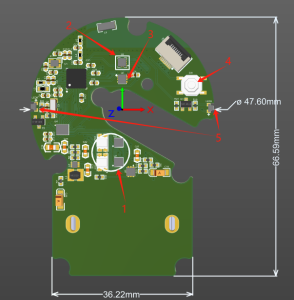
- Photoplethysmograph(PPG) Sensor
- Accelerometer
- Temperature Sensor
- Reset Button
- LED
Why Is the Heart Rate Not Detected?
If the Cow Ear Sensor fails to display heart rate data consistently, please check your operation according to the following requirements:
- Ensure your finger is accurately attached to the position of the device's photoelectric sensor without any offset or gap.
- Keep your finger completely still during the measurement to avoid shaking, ensuring the sensor can collect data stably.
How to View Raw Sensor Data?
Ensure that a Bluetooth connection has been successfully established between your phone and the Cow Ear Sensor. Once connected, you can view the raw data waveforms of Accelerometer and PPG on the corresponding page of the App.
Meanwhile, all collected raw data will be automatically uploaded to the cloud. You can view and manage the data in the backend system. For detailed instructions on how to access the backend and view clinical test data, please refer to the Clinical Test Guide.
How to Turn On the LED Indicator(Pull Alert)?
Ensure that a Bluetooth connection has been successfully established between your phone and the Cow Ear Sensor.
- On the device's main interface, tap the Settings Icon in the upper right corner to enter the Device Settings Page.
- On the Settings Page, find the LED Switch option and tap the switch button to turn the indicator on or off.
- After the LED is turned on, it will turn off automatically after 5 seconds by default, and the status of the switch button will switch to the off state synchronously.
Why Can't the APP Search for or Connect to the Cow Ear Sensor?
-
Sensor Broadcast Interval – to conserve power, the Cow Ear Sensor Broadcasts at up to 30 second intervals, so it will not be readily broadcasting its ability to connect. Please try a few times to connect before.
-
Please check if the distance between your phone and the Cow Ear Sensor is too far. The Ear Sensor operates on Bluetooth and generally works within 50 ft
-
If yes, move your phone closer to the Cow Ear Sensor and try again.
-
If no, please remove the button battery from the Cow Ear Sensor, reinstall it, and try again.
-
-
Please use nRF Connect to search for the Bluetooth device named COW_IOT. If it cannot be found after multiple attempts, it indicates that the cow ear tag sensor may have insufficient battery power. Please replace the CR2477 coin cell battery and try again.
-
Please check if Bluetooth and location services are enabled on your phone. If not, enable them first before proceeding.
-
Please check if the device is already connected to another phone. If yes, disconnect it from that phone first and then try again.
Main Parameters of the Cow Ear Sensor
| Parameter | Range |
|---|---|
| Product size | 695212mm |
| Input | 3V CR2477 |
| Connection Methods | BLE 5.2 |
| SPO2 Measurement range | 70%-100% ±2% |
| HR Measurement range | 30-200 BPM |
| Temperature Measurement range | 0-50 ℃ |
| Operating humidity | ≤85% |
| Operating Temperature | 0℃~40℃ /32℉~104℉ |
| Storage Temperature | -10℃ -60℃ |